

Browser
by pumi-dev
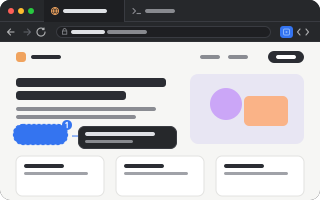
A web page in a tab: back, forward, reload and an address bar over the app's webview, and where cmd+click opens a terminal's links. An agent reads and drives the page (snapshot, click, fill, eval, console, screenshot), and the user picks elements and leaves notes an agent reads. Without it, links open in the system's browser.
What it adds
- Commands
openBrowser: open a pageopenViewBrowser: open a page in a new view- Pane types
page- Settings
- 4
README
A web page in a tab, with back, forward, reload and an address bar over it, and where cmd+click sends a terminal's links. pumi itself has only the webview (<WebView>, useWebview), which any plugin draws pages with; the browser is this plugin.
pumi plugin add pumi-dev/plugins/browserWithout it, a terminal's cmd+clicked links open in the system's browser.
pumi call pumi_dev.browser.open '{"url":"https://pumi.dev"}'    # beside this tab
pumi call pumi_dev.browser.openView '{"url":"example.com"}'     # in a view of its own
pumi tab open pumi_dev.browser.page '{"url":"https://example.com"}' --split rightopen's address is its argument ({ url }, or a plain string), else home_url, else the address bar.
Options
home_url | the page a new browser tab opens; empty starts in the address bar |
search_url | the address bar's search engine; {query} is what was typed |
open_links | where cmd+click opens a terminal's links: a browser tab (app) or the system browser (system); shift+cmd+click opens the other |
url | a tab's own: the page it is on. Setting it navigates; the page writes it back as it goes |
Whether pages get their Web Inspector (alt+cmd+i) is pumi's webview_devtools, in Settings ▸ Plugins.
Links from terminals
A terminal's cmd+clicked link goes to pumi_dev.browser.open with {url, tab, link: true, shift}: it opens beside that terminal, or in the system's browser when open_links says system (shift says the other) or the link is no page (mailto:).
The tab
| the toolbar | back, forward, reload (stop while it loads), the address, the page's name, the picker, devtools |
| the keys | cmd+l the address, cmd+r reload, cmd+[ back, cmd+] forward, while it has the keyboard |
| the address bar | a URL, a host (example.com, localhost:3000) as an address, anything else as a search |
| the state | the address is the tab's url option and the name is its title: tabs that come back come back where they were |
tab.call reaches the block's own methods (navigate, back, forward, reload) and the protocol's (read, selection, input):
pumi tab navigate %3 '{"url":"example.com"}'
pumi tab read %3                             # the name, then the address
pumi tab input %3 --text 'example.com/next'  # typed into the address bar, and Enter
pumi call pumi_dev.browser.back %3           # also forward, reload, navigate, url, title
The toolbar has a picker for notes to an agent too, and the package drives the page for one (below).
For agents
An agent reads and drives the page with the package's functions, each taking the tab and a JSON object (pumi help pumi_dev.browser.click says what one takes). Each is also the block's method (tab.call("%3", "click", {…})). They run in the window that draws the tab, so the tab has to be shown in one.
pumi call pumi_dev.browser.snapshot %3                              # headings, text, controls with refs
pumi call pumi_dev.browser.click %3 '{"target":"e12"}'              # a ref, a selector, or {"text":"Sign in"}
pumi call pumi_dev.browser.fill %3 '{"target":"input[name=email]","value":"[email protected]"}'
pumi call pumi_dev.browser.press %3 Enter
pumi call pumi_dev.browser.waitFor %3 '{"text":"Saved"}'            # or {"load":true}, {"selector":…,"gone":true}
pumi call pumi_dev.browser.eval %3 'document.title'                 # an expression, or a body that returns
pumi call pumi_dev.browser.console %3 '{"level":"error"}'
pumi call pumi_dev.browser.screenshot %3 # a PNG's path (macOS)| function | what it does |
|---|---|
snapshot | the page as text: address, title, scroll, then headings, text, and each link, button and field with a ref ([e12]) |
text, html | the page's (or one element's) text, or HTML |
find | one element: ref, unique selector, role, name, box, attributes, HTML, ancestors, style, and its source file and components where a React, Vue or Svelte dev build says |
click, hover, fill, type, press, scroll | what a person does, as DOM events at the element |
waitFor | an element there or gone, or the page loaded |
eval | JavaScript in the page, as its own script; the value as JSON |
console | its console lines and uncaught errors since it loaded (the last 300) |
screenshot | a PNG of what the page shows, in the plugin's cache or at path |
notes, clearNotes | the user's notes on its elements, below |
Synthetic events are not trusted ones: a page that checks isTrusted, or a native control (a file picker), can tell.
Notes for the agent
The toolbar's picker (the square, beside devtools) outlines the element under the mouse; a click takes it (↑ climbs to its parent, Esc gives up), and a bar asks what should change. The notes stay on the page, outlined and numbered, and in a strip under the toolbar.
An agent reads them with the block's own method, tab.call(tab, "notes") (the same as pumi call pumi_dev.browser.notes %3); its describe says what they are. Reading them marks them read, and clearNotes (or the strip's Clear) takes them off. Nothing tells an agent the notes are there: it reads them when it is asked to, or when their describe is what it looks at. The notes are kept with the plugin, so they survive a restart.
What a webview cannot do for it: no profile, cookies, downloads or zoom of its own; a link the page opens in a new window goes to the system's browser; another site's document is not readable, so selection is empty.
Development
pumi plugin dev browser   # link it, reload on save
bun test                  # the address bar's rules