

CSV Viewer
by pumi-dev
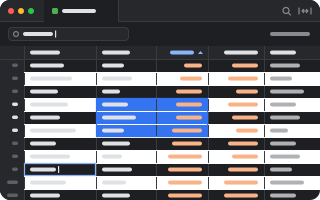
CSV, TSV and other delimited files as a table: sort, search, resize columns, copy and edit cells, and save them back.
What it adds
- Commands
openCSV Viewer: open a filereloadCSV Viewer: read the file again- Adds to
tab.toolbar- Settings
- 7
- Uses
- files
README
CSV, TSV and other delimited files as a table: sort by a column, search every cell, drag a column wider, pick and copy cells, and edit them. Edits are written to the file when you save.
pumi plugin add pumi-dev/plugins/csv-viewer
pumi open data.csv                              # the file, drawn as a table
It draws *.csv, *.tsv, *.tab, *.psv and *.dsv, however they are opened: pumi open, the File Tree, the palette or an agent. CSV Viewer: open a file picks one in a file dialog.
- Guesses the format: the delimiter (comma, tab, semicolon or pipe) from the first fifty records, and whether the first row is a header.
- Sort: click a column's name for up, down, then off; shift-click sorts by several. A column of numbers sorts as numbers, so
9comes before10. - Search: keeps the rows holding every word typed, in any cell.
- Columns are as wide as their contents, and the table scrolls sideways; the bar's button squeezes them to fit the tab instead.
- Big files: only the rows in view are drawn, so 100,000 rows scroll as fast as ten.
- Follows the file: a script that rewrites it updates the table. With unsaved edits, the table says so instead of dropping them.
- Pick cells with a click, a drag, shift-click, or the arrow keys (shift grows the block, ⌘ goes to the edge, Tab moves sideways). Click a row's number to pick the whole row; ⌘A picks all.
- Copy: ⌘C copies one cell as it is, or a block as tab-separated text that pastes into a spreadsheet as cells. The right-click menu also copies whole rows, quoted the way the file writes them, or whole columns.
- Edit a cell in place: double-click it or press Enter. Enter keeps the change and goes down, Tab goes sideways, Escape throws it away. Backspace empties the picked cells.
- Rows and columns: the right-click menu inserts and deletes rows and columns, and renames a column (right-click its name for the column's menu).
- Undo and save: ⌘Z and ⇧⌘Z undo and redo. Edits stay in the tab until ⌘S or Save writes them; Discard throws them away. A save changes only the lines you edited: quotes, line endings and rows past Rows at most are kept. If something else changed the file in the meantime, you choose between overwriting it and reading it again.
Options
Settings → CSV Viewer.
| Header row | guess, the first row, or none |
| Delimiter | guess, comma, tab, semicolon, pipe |
| Right-align numbers | a column of numbers lines up on the right |
| Striped rows | tint every other row |
| Column widths | as wide as they need, or squeezed to the tab |
| Follow the file | read it again when it is rewritten |
| Rows at most | 100,000; the rest are counted, not drawn |
Development
pumi plugin add "$PWD" --linked      # in csv-viewer/: use this folder as it is
bun test                             # parsing, widths, editing and writing back
The table is TanStack Table's, headless, drawn with pumi's own elements.