

What it adds
- Commands
toggleGit: show the changes and the history- Pane types
diff- Adds to
panel- Settings
- 3
- Key bindings
- 1
- Uses
- files, processes
README
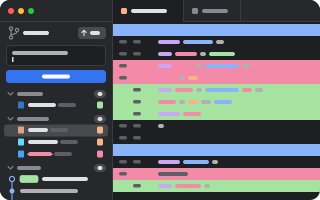
Git in the sidebar: stage, commit, history and diffs, for the repository of the tab you are in.
pumi plugin add pumi-dev/plugins/git- Changes: staged, unstaged and conflicted files as a path tree. Stage, unstage, discard, ignore, take ours or theirs, and commit (⌘↵).
- History: the commits, newest first, with tags, authors and what the upstream hasn't got.
- Diffs: a file, the whole work tree or a commit, in a tab drawn in the window's theme.
- Sync: publish, fetch, pull and push from the button beside the branch.
- Several repositories: in a folder that is not a repository, each one up to two levels under it is a section of its own, with its branch and how many files it changed. The branch bar, the commit box and History are of the one you clicked last. The home folder is not searched.
ctrl+shift+g shows or hides it; the palette has it as Git: show the changes and the history.
| Key | |
|---|---|
| click | a file's diff; fold a directory |
| double click | open the file |
| right click | discard, ignore, take ours or theirs |
j/k, ↑/↓ | move |
| enter, space | stage or unstage |
/ | filter |
esc | clear the filter |
Options
date_format | relative (3 days ago) or absolute (2025-10-09 08:53) |
show_author | show each commit's author |
Development
pumi plugin dev git   # link it, reload on save
bun test              # the git work, against a temporary repository
It needs git on PATH.