

Launcher
by pumi-dev
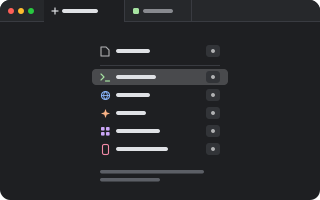
A tab that lists what you can open in it: a file, and whatever your plugins add to the + menu (a terminal, a page, an agent…). Pick one and it takes the tab's place. Set it as what new tabs open, and every new tab, split and session starts with the list.
What it adds
- Pane types
new
README
A tab that lists what you can open in it: a file, and the same list as the + menu (Terminal's shell, each agent, Browser's page, …), the most used first, each with a key to press. What you pick takes the tab's place, in the same pane.
pumi plugin add pumi-dev/plugins/launcherNew tabs
Pick Launcher in Settings ▸ General ▸ New tabs open (pumi's new_tab option, pumi_dev.launcher.new) and every new tab, split, view and session starts as the list. The start screen does this when Launcher is among the plugins it installs.
Keys
| Key | |
|---|---|
F | a file, from the system's picker |
| a row's letter | that row: the same letter as in the + menu (C Claude Code, P Pi, T Terminal…), which stays as the order changes |
↑ ↓, Enter | choose one, open it |
Escape | close the tab |
On a pumi before useNewTabs, the list is the tab.new slot's actions, in order, on 1 … 9.
The block
pumi_dev.launcher.new takes no arguments. src/ui.tsx draws it with the + menu's list (useNewTabs from pumi/theme), less its own row; src/kinds.ts is what the list holds, apart from drawing it.
Testing
bun test