

Music Studio
by pumi-dev
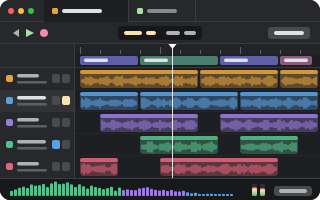
A song in a tab, the way GarageBand lays it out: the transport and the bar it is on, the song's parts on an arrangement track, a row a track with mute and solo, the spectrum, the waveform and the meters. Told about tempo, key and chords too, and notes on a part are the agent's to read.
What it adds
- Pane types
player- Uses
- processes, files
README
A song in a tab, laid out the way GarageBand lays it out: the transport and the bar it is on, the song's parts across an arrangement track, a row a track with mute and solo, a spectrum that moves to the music, the meters, and notes you leave on a part for an agent to read.
pumi plugin add pumi-dev/plugins/music-studio
pumi call pumi_dev.music_studio.open '{"path":"take.wav"}'
The tab opens beside the one you are in ({"split":"down"} for below it, {"play":true} to start it playing).
What it shows
- The LCD: bar and beat, tempo, time signature and key, with the loudness reading under them.
- The arrangement: the song's parts (its sections) as coloured bands over the bar grid, with the cycle overlay for the part you picked.
- A row a track: its icon, mute and solo, and its regions drawn as GarageBand draws them — a piano roll for a software instrument, hits for a drummer, a waveform for audio.
- The spectrum, 56 bands at 30 frames a second against a dB grid, and stereo meters with peak holds and the momentary, integrated and true-peak numbers.
- Notes: a track of their own across the song, and a box to type one on the part you picked.
Drag along the ruler to pick a part (Esc clears it), type a note on it, or click the ruler to play from there. Muting a track re-mixes what is playing without stopping it.
What it measures
The song is decoded by ffmpeg; tempo, key and onsets are essentia.js in the plugin's worker; the rest — loudness (LUFS, momentary and short-term), true peak, each bar's level and balance, the chords heard, the spectrum and the waveform — is worked out in src/analyze.ts. The report function writes all of it as text, bar by bar, for an agent that cannot hear the song.
Two files beside the song, both optional and both written by whoever made it, say more:
<song>.markers.json | |
|---|---|
bpm, offset, beatsPerBar | the grid, when the file knows it better than the detector does |
sections | the parts, {at, name}, in seconds |
cues | moments to line up with, {at, name} |
chords | what each bar's chord was meant to be, to check against what is heard |
<song>.tracks.json is the song's parts as GarageBand's: one per stem, with its kind, colour, the stem's own file, and what it plays. A note you leave is kept in <song>.notes.json.
What it needs
- ffmpeg (
ffplay,ffprobe,ffmpeg): playing, measuring and re-mixing the tracks.brew install ffmpeg. - sox, for
spectrogramonly:brew install sox. essentia.jscomes with the plugin.
Both are looked for on PATH and then in the usual Homebrew and system folders, so a pumi started from the Dock finds them. Playback is ffplay on the song, or on the tracks the mixer lets through, summed by ffmpeg the way the mix sums them.
The tab
| block | pumi_dev.music_studio.player, drawn by src/ui.tsx's Player |
| methods | play, pause, toggle, stop |
| title | ♪ and the song's title, as its tags say |
Functions
What a tab's methods do, for the tab's own song:
player.play | play from a point, to a point, or a range on a loop |
player.pause, player.toggle, player.stop | the transport |
player.mix | mute or solo a track, by its id |
player.state | whether it is playing and where |
player.describe | the song, measured, with its notes |
And for a song by path: open, report (the measurements as text), analyze (the same as data), spectrogram (a PNG of a range, drawn by sox), notes, note.add, note.done, note.remove.
An agent can therefore be told "the bass is muddy at 1:20" and answer with a note on that part, or ask analyze for each bar's numbers and work on it.
Working on it
bun install
bun run check                  # the worker and the window
pumi plugin dev music-studio # link it, reload on savesrc/main.tsis the plugin's worker: the transport, the mixer, the notes, and the functions.src/analyze.tsis the measurement: pure, and apart from the tools it calls, plain arithmetic.src/ui.tsxdraws the window: GarageBand's own dark look, whatever the pumi theme is.src/glyphs.tsis the SVGs the player draws.