

Pixel Office
by pumi-dev
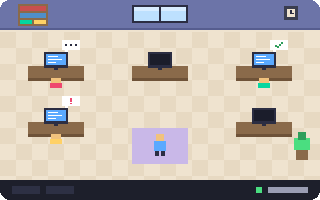
A UI theme: pumi as a pixel-art office you walk around, with a desk for every view, its agent at it and its screen live.
What it adds
- Themes
themes/pixel-office- Settings
- 2
README
A UI theme: pumi as a pixel-art office you walk around. Every session is a room, every view a desk whose little screen shows its tab live, and every tab with a status sits at its desk as a player with a bubble saying what it is doing.
pumi plugin add pumi-dev/plugins/pixel-office
pumi option set ui_theme pixel-office- Walk with WASD or the arrow keys, or click the floor. The wheel looks around.
- Sit at a desk (walk up and press X, or click it) and its views open on the monitor. Stand up, or a click outside, closes it.
- Players: a player is a tab with a status (
@status: an agent at work, or anything else that says what it is doing). Typing dots while it works,!when it needs you, a tick when it's done. Click one in the lobby to walk to its desk. - The lobby down the left (⌘B, or the bookshelf) has every player and every plugin's sidebar panel on a notice board.
- Decorate: place furniture, move it, and change the floor, the wall paint and the lights. It all stays where you put it.
- Drag a desk to move it, double-click to rename its view, right-click for its menu.
- Play: ping-pong, the arcade, the lamp, the TV. 1–5 are emotes.
Options
Settings → Pixel Office.
| Mode | the office by day (light), at night (dark), or as the system is |
| One desk per tab | each tab of a split view gets its own desk, player and screen |
Development
pumi plugin dev pixel-office   # link it, reload on save
bun test                       # the walk and the floor plan
bun tools/art.ts               # redraw the furniture and the wall paints
themes/pixel-office/plan.ts places the rooms and desks, game.ts walks you, window.tsx draws the room, kit.tsx the pixel boxes and name tags, parts.tsx the window's other parts and build.tsx the Decorate mode. The font is Pixelify Sans (SIL Open Font License 1.1, themes/pixel-office/fonts/).