

iOS Simulator
by pumi-dev
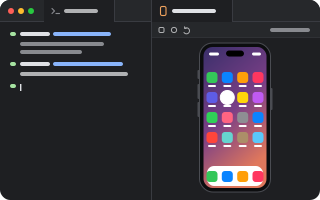
An iOS Simulator in a tab: serve-sim streams it, a webview draws it, and touches, keys and the device's buttons go back to it.
What it adds
- Commands
openSimulator: openstopSimulator: stop streamingscreenshotSimulator: screenshot- Pane types
device- Adds to
palette.actions- Settings
- 5
- Uses
- processes, network
README
An iOS Simulator in a tab. The simulator is Apple's (CoreSimulator); this plugin is the plumbing: it finds one with simctl, boots it, runs serve-sim beside it, and draws the stream in a webview. Touches, drags, keys and the device's buttons go back to the device over serve-sim's own websocket, so the tab is a fully interactive simulator, with no Simulator.app or Xcode window.
pumi plugin add pumi-dev/plugins/simulatorThen Simulator: open in the palette (⌘K), or pumi call pumi_dev.simulator.open.
What it needs
- macOS with Xcode, and an iOS Simulator runtime (Xcode ▸ Settings ▸ Components). Nothing can boot without one;
xcrun simctl runtime listsays what is installed. - Node 20+. serve-sim's native helper is a Node-API addon, so it runs on Node, not Bun. It is found on
PATH, else in nvm or Homebrew; thenodeoption overrides. - Apple Silicon. serve-sim's helper is arm64 only.
The first open installs serve-sim (pinned by the version option, 0.1.48 by default) into the plugin's cache. That takes a few seconds, once.
How it works
src/main.tsruns in the plugin's worker:xcrun simctlfor what simulators exist and booting them, and one supervisedserve-simper booted device, reaped when the last tab showing it closes. It reads serve-sim's state file ($TMPDIR/serve-sim/server-<udid>.json) for the address the streamer actually took, so a streamer someone else started is reused rather than duplicated.src/ui.tsxdraws<WebView src={url}>with serve-sim's preview page in it: the stream, the device chrome, the toolbar and the input. The page belongs to another server, so it brings its own look and does not getwindow.pumi.- Nothing native is added to pumi. The native part (CoreSimulator, IOSurface capture, VideoToolbox H.264, Indigo HID) is inside serve-sim's helper, which is a process this plugin spawns.
Streams bind to 127.0.0.1 only. serve-sim's preview server also has a token-gated shell-exec route: this plugin never proxies it, and nothing should.
Options
| option | default | |
|---|---|---|
udid | none | a tab's own: the device it shows (a udid or a name) |
port | 3210 | the first port serve-sim may take; it moves up when one is busy |
version | 0.1.48 | the serve-sim release installed into the plugin's cache |
node | found | the node binary that runs serve-sim |
keepalive | 120 s | how long the streamer stays up after its last tab closes |
Commands and API
- Simulator: open boots the booted (or first usable) device and opens a tab beside the current one.
- Simulator: stop streaming stops every streamer this plugin started.
- Simulator: screenshot takes a PNG of the device's screen and shows it in a tab.
For agents and other plugins (pumi registry list fn | grep simulator). The plugin activates on startup, so these exist as soon as the app is up, with no tab open:
pumi call pumi_dev.simulator.devices                              # [{ udid, name, runtime, state, available }]
pumi call pumi_dev.simulator.stream '{"device":"iPhone 18 Pro"}'  # { url, streamUrl, wsUrl, port }
pumi call pumi_dev.simulator.screenshot '{"device":"iPhone 18 Pro"}'
pumi tab open pumi_dev.simulator.device '{"pumi_dev.simulator.udid":"iPhone 18 Pro"}' --split right
device is a udid or a name, and the booted device when it is left out. screenshot answers the path to a PNG, so an agent can read the device's screen without a tab open. stream starts the streamer if it is not up; streamUrl is a plain multipart/x-mixed-replace MJPEG body, which anything can read.
What to know
- Closing the app stops every streamer (
keepaliveaside), and a worker reload kills what the previous run started, from a record in the plugin's state directory (helpers.json). - Xcode 27 keyboard input goes through Xcode's Device Hub: serve-sim needs it running with the simulator window frontmost, and macOS may ask for Accessibility for the app that launched pumi. Touches do not need any of that.
SERVE_SIM_DISABLE_DEVICE_HUB_KEYBOARD=1opts out. - A device that shuts down takes its streamer with it (
--exit-on-simulator-shutdown); the tab keeps the last frame until you retry. - iPhone Duo (Xcode 27.1 + iOS 27.1) gets serve-sim's folded, semi-folded and open controls and its RealityKit shell in the same tab, because the shell is part of the preview page.
- "The streamer is still running" is usually
keepalive, or a streamer listed in$TMPDIR/serve-sim/.pumi plugin logs simulatorshows serve-sim's own output, which the tab also prints when the streamer fails to come up.
Development
pumi plugin dev simulator   # link it, reload on save
bun run check               # types